













NEW Drawboard Projects × Autodesk Forma — the review layer on top of your designs. Learn more →

PDF markup software

The next generation of PDF markup and collaboration

Mark up drawings, run design reviews and track issues with your whole project team. From architects, engineers and builders, in the office or on site.

Windows · iPad & iPhone · macOS · Android · Web

Thousands of experts are doing their best work with Drawboard
  • AECOM
  • Arion
  • Toyota
  • Jacobs
  • Pennoni
  • OXY
  • John Holland

Two products. One way of working without paper.

Start with the one that fits how you work today.

For anyone working with PDFs, on your own or with a team

Drawboard PDF Logo

Full-power PDF markup, measurement and takeoff

Easy-to-use markup tools
Add and edit markups directly on your PDF
Store and share documents with others
Live sync all annotations across all devices
Learn more

For design, engineering and construction teams

Drawboard Projects

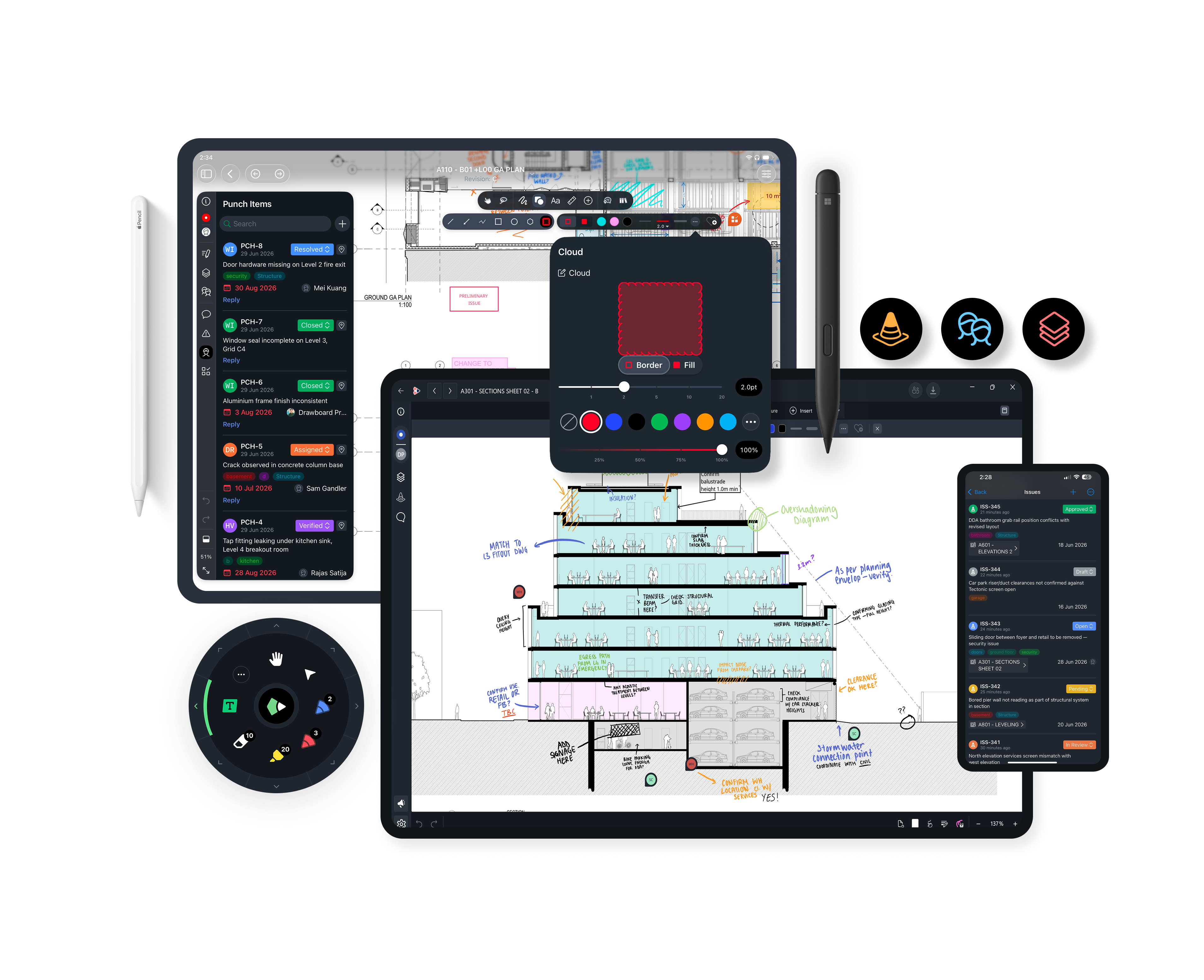
A team workspace to get everyone on the same page
Drawboard Projects
Assign and track tasks on drawings with pins and threads
Filter, organise and export work from one task list
Invite external partners with free guest access
Sync with Revit, Procore and Forma

Start using Drawboard PDF

Free on Windows, iPad and iPhone, macOS, Android and in your web browser.

Features

Easy-to-access online PDF tools

All the tools you’ll need to be more productive and work smarter with documents. A streamline online pdf experience for quick use.

For every industry

A better way to work without paper

Speed up design reviews with Drawboard Projects

Mark up in the same place as other reviewers and attach trackable issues to specific areas on every revision.

Learn more

Redline and review

Annotate and create comments on long-form documentation and share with others with just a couple clicks.

Learn more

Prepare and collate notes

Mark up case notes, review precedent and create notes to share with clients in a PDF app that feels like pen and paper.

Learn more

A no-fuss and easy to use PDF annotator

Drawboard PDF is trusted by government bodies worldwide as an easy-to-use annotator for Windows 10.

Learn more

Mark, prepare and illustrate

Throw away the overhead projector and the red marker. Drawboard PDF feels like pen and paper and is trusted by educators worldwide.

Learn more

Stay organized with Drawboard PDF

Review texts, and take notes as you study. Brainstorm, take notes, generate new ideas and share with your project team quickly and easily.

Learn more

Review articles and take detailed notes

Drawboard PDF is the ideal annotation application for long-form PDFs. Export your text reviews or save only annotated pages for later reference.

Learn more

Access and mark up only the latest revision

Drawboard Projects syncs all markups and comments on drawing revisions to the cloud instantly.

Learn more

Stay on top of the details

Drawboard Projects gives you visibility on all document reviews project-wide. Everything in the same place.

Learn more

Instant markups between the office and the field.

Drawboard Projects ensures that all markups made on site are saved instantly to the cloud, making documentation easy to collate later.

Learn more

Software made for heavy-document industries

Whether it's Drawboard PDF for quick markups or Drawboard Projects for building-related project review cycles, our goal is to make paperless work easy.

Customer story · Arion

“For process engineering, one of the things that we like to do is put PFDs and P&IDs in there, redline those documents, and we can share them with people.”
Matt Walker Mechanical Engineer, Arion
Read the Arion story All case studies →

Speed up design reviews with Drawboard Projects

Mark up in the same place as other reviewers and attach trackable issues to specific areas on every revision.

Learn more

Redline and review

Annotate and create comments on long-form documentation and share with others with just a couple clicks.

Learn more

Prepare and collate notes

Mark up case notes, review precedent and create notes to share with clients in a PDF app that feels like pen and paper.

Learn more

A no-fuss and easy to use PDF annotator

Drawboard PDF is trusted by government bodies worldwide as an easy-to-use annotator for Windows 10.

Learn more

Mark, prepare and illustrate

Throw away the overhead projector and the red marker. Drawboard PDF feels like pen and paper and is trusted by educators worldwide.

Learn more

Stay organized with Drawboard PDF

Review texts, and take notes as you study. Brainstorm, take notes, generate new ideas and share with your project team quickly and easily.

Learn more

Review articles and take detailed notes

Drawboard PDF is the ideal annotation application for long-form PDFs. Export your text reviews or save only annotated pages for later reference.

Learn more

Access and mark up only the latest revision

Drawboard Projects syncs all markups and comments on drawing revisions to the cloud instantly.

Learn more

Stay on top of the details

Drawboard Projects gives you visibility on all document reviews project-wide. Everything in the same place.

Learn more

Instant markups between the office and the field.

Drawboard Projects ensures that all markups made on site are saved instantly to the cloud, making documentation easy to collate later.

Learn more

Software made for heavy-document industries

Whether it's Drawboard PDF for quick markups or Drawboard Projects for building-related project review cycles, our goal is to make paperless work easy.

Connect Drawboard to the tools you already use

Open files from your cloud storage, publish from your design tools and keep reviews in sync with document control.

Free online PDF tools

Quick PDF jobs, right in your browser.

See all PDF tools →

For students

Study smarter with Drawboard PDF

Handwrite notes that feel like paper, annotate lecture slides and readings, and keep everything in sync from your iPad to your laptop. Drawboard PDF is free to start.
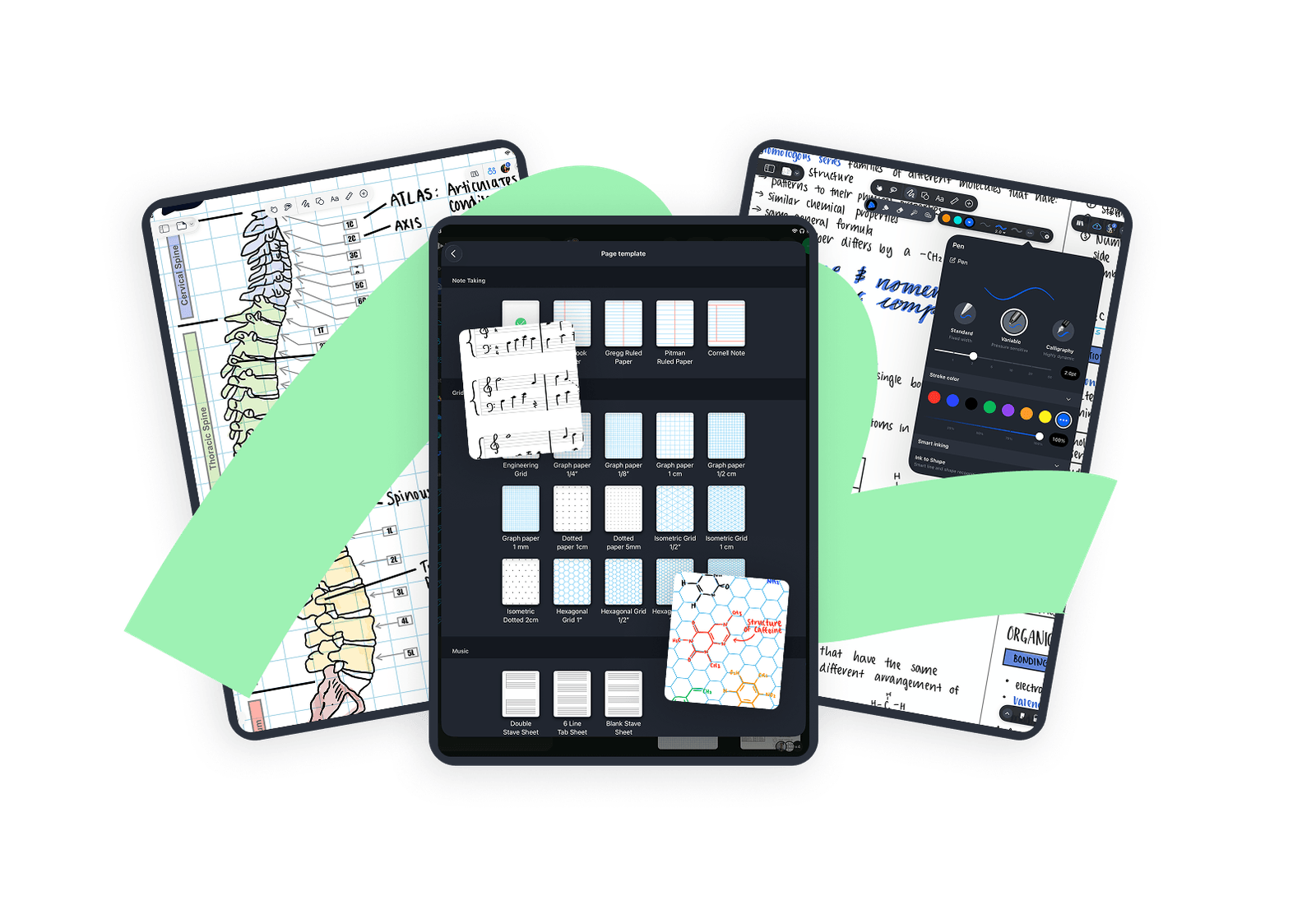

  • Pressure-sensitive handwriting
  • Graph, ruled, Cornell and music templates
  • Annotate slides, readings and PDFs
  • Share notes with your study group
Drawboard PDF on three iPads showing handwritten anatomy and chemistry notes and a choice of page templates
Get started with
Drawboard PDF
download windows
Web browser button
Apple app store button
Download Google Play for Android
Available on Windows, iOS, macOS, Android and in your web browser.